
A sports fixture, a slot cover and a live-casino table can sit only a few taps apart on the same homepage. Each asks the reader to pay attention to a different set of details. The useful starting question is simple: which category are you actually opening?
This guide looks at the Malaysia edition of WABO MY. Within this mobile guide, the category catalogue provides a starting point for understanding how sports, electronic games and live casino are organised. The screenshots show the Chinese mobile interface on that Malaysia route.
Give the category a moment before following the artwork
Large artwork naturally draws the eye, especially on a phone. A category label gives that artwork a useful context. A football image might introduce a sports section, a specific fixture or a promotion. Reading the destination page’s heading tells you which route the image opened.
Use the Malaysia route identified in this guide, then choose the category that matches your question. Someone looking for a game’s instructions needs a different page from someone looking for a match’s starting time. A clear purpose makes the first visit easier to follow and helps you return to the same information later.
The sports route begins with a provider catalogue
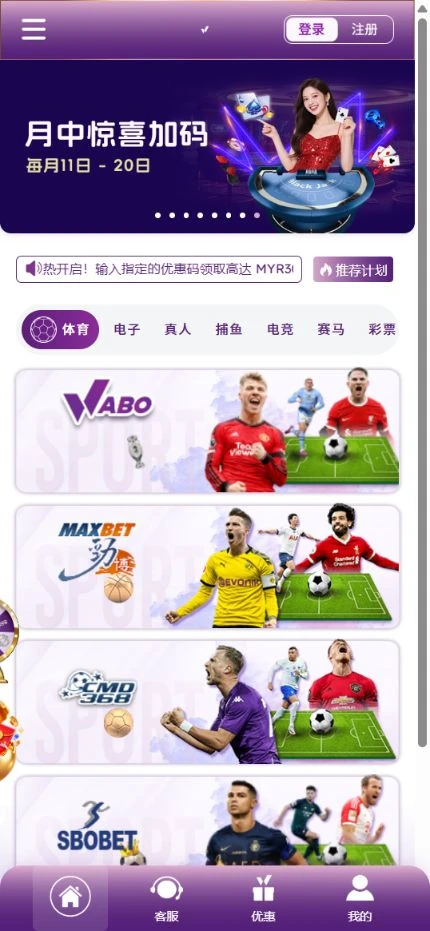
The 体育 capture shows WABO, MAXBET, CMD, SBOBET and OB as provider cards. Each label identifies a route into a sports service. Once an actual event listing is open, read its competition, participants and date together to identify the fixture.
Time information deserves the same attention. Use the time zone displayed by the current page when one is provided. When sharing an event with a friend in another country, include the date and time zone with the link. This gives both readers a common reference before they compare any match information.
Electronic-game lists use names and providers to organise choice
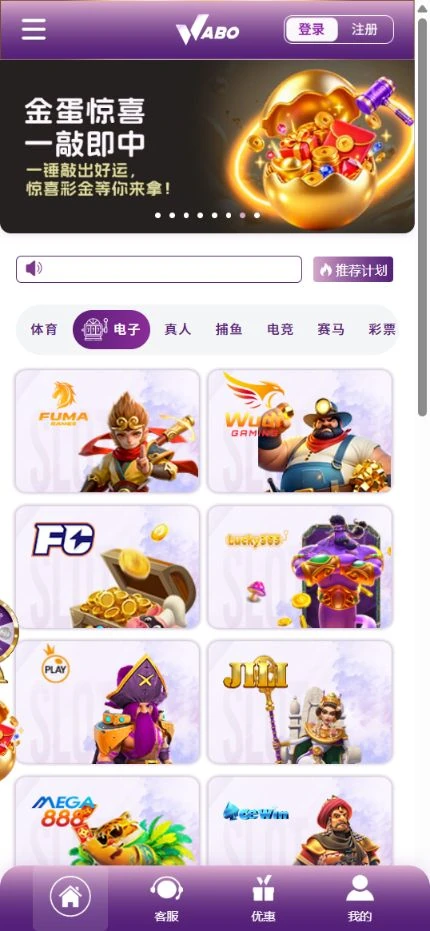
An electronic-game category usually presents a collection of individual titles. Cover art helps you recognise a game, while the full name helps distinguish releases from the same series. A provider label adds another way to organise the collection.
Imagine that a friend remembers the provider but cannot recall the title. The practical route is to open the relevant category, find the provider’s list where available and compare the complete game names. Once the title is identified, open its own information or help screen to read about symbols, features and the way the game works.
Live-casino pages introduce another layer of information
A live-casino listing may organise its content by game type, table or room. Read the labels on the particular page you open. If it displays language options or a table name, keep those details with the game type so that you can recognise the same listing again.
Where the selected game or table provides an information control, open it before exploring further. That is where the current page can explain its own format. Information displayed for one listing should be read in its own context when several similar-looking options appear side by side.
A provider label and a website menu do different jobs
The WABO MY menu helps readers move around the Malaysia site. A provider label helps identify the source of a particular game within that site’s collection. Keeping both names in view makes a question easier to describe.
When asking about a game, include its category, provider, complete title and page link. Those details give support a clear starting point and help you compare the page with a saved image.
Read a promotion in the place where its conditions are published
Homepage banners give a short introduction to an offer. The associated detail page is the place to look for the dates, region, eligible participants and conditions that apply to that offer. Keep the headline and the full explanation together when deciding what the message says.
If a detail is missing or unclear, use the site’s displayed support route to ask about that specific point. Include the offer’s name and the page you were reading. A published banner can change over time, so the date of a screenshot matters when it is used as a reference.
Make the next visit easier to follow
A short note can be enough to make a useful return route: Malaysia edition, category name, provider or event name, then the relevant detail page. This records the information you wanted without relying entirely on a familiar colour or a particular banner.
The same approach works when you share a page. Send the full link with a sentence explaining what to read there. The screenshots in this article illustrate the interface at capture time; the live page supplies the current labels, available content and published explanations.
This online casino Malaysia guide follows a simple route from category labels to the information they open. For sports, the provider catalogue comes before the fixture page and its event details.
Frequently asked questions
Which WABO edition does this guide cover?
It covers WABO MY’s Malaysia edition. Read the region and other labels on the live site when following the screenshots.
Where should I read the instructions for a particular electronic game?
Open the selected title’s own information or help screen. Use its complete name and provider label to confirm that you have the intended game.
What should I include when asking about a page?
Include the region, category, full title or event name, page link and the time of your screenshot. These details help identify the exact content you are asking about.
For a narrower follow-up on this site, our WABO SG reading guides explain slot multipliers and round totals and the mobile My menu. Keep their Singapore edition context alongside this Malaysia-focused tour.